Capifront Guard: we help you not fail
Most challenges are lost to the daily loss limit, not to bad entries. Capifront Guard is a free add-on for MetaTrader 5 that shows how much you can still lose today and overall, warns you early, and can close your trades before a limit is hit.
What it does
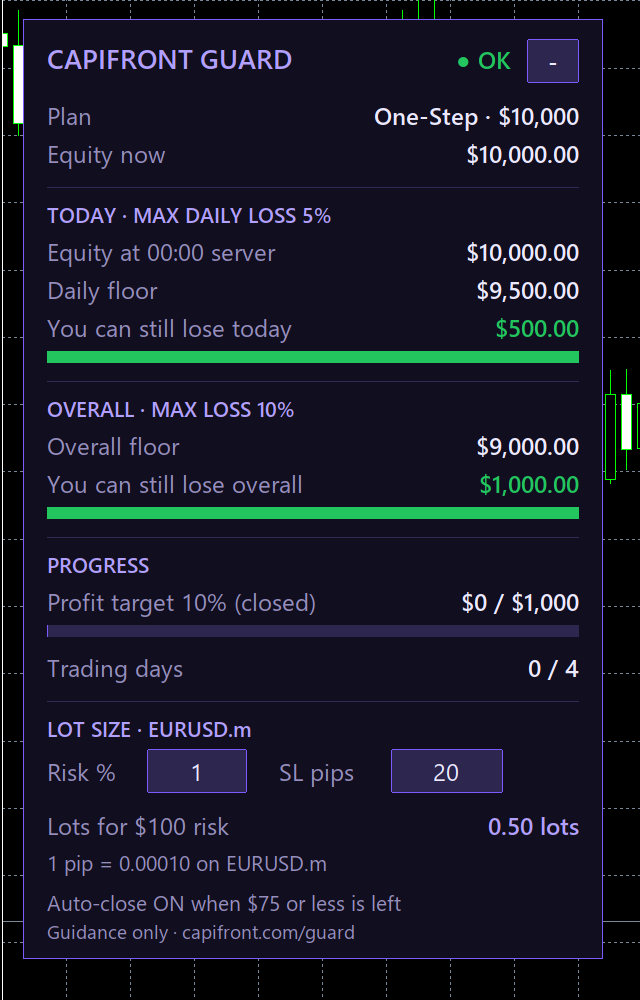
- Shows your real room. “You can still lose today” and “You can still lose overall” in dollars, updated every second. It uses the method in our trading rules: equity at 00:00 broker server time minus the daily allowance, and starting balance minus the overall allowance. Today’s room never shows more than what is left overall.
- Warns you early. When less than 40% of the daily limit is left, the panel turns amber and MT5 shows an alert. If MT5 push notifications are set up, the alert also reaches your phone.
- Can close trades before a breach. With auto-close on (the default), Guard closes every open trade and deletes pending orders when only 15% of the daily limit is left. Until the next server day it then closes any new trade. You can change both levels or turn auto-close off.
- Sizes your trades. Type your risk % and stop-loss in pips on the panel; Guard shows the lot size for the chart’s symbol and warns you if that risk is bigger than what is left today.
- Tracks progress. Profit target progress and trading days for your plan.
Install in 2 minutes
- Download
CapifrontGuard.ex5. - In MetaTrader 5, open File → Open Data Folder, go to
MQL5 → Expertsand paste the file there. - Back in MT5, right-click Expert Advisors in the Navigator and choose Refresh.
- Drag CapifrontGuard onto any chart. Tick Allow Algo Trading, open the Inputs tab, choose your plan and phase, and type your account size (for example 10000).
- Make sure the Algo Trading button in the toolbar is on. Keep MT5 open while you trade.
Guard watches the whole account, so one chart is enough. To build it yourself, open the .mq5 source in MetaEditor and press Compile.
Settings
| Setting | Default | What it does |
|---|---|---|
| Your plan and phase | One-Step | Sets the limits: 5% daily and 10% overall (6% and 12% on Capifront Pro), plus the profit target and minimum trading days. |
| Account size | 0 (auto) | Your challenge size, for example 10000. With 0, Guard reads the first deposit; set it yourself if the panel says “set size!”. |
| Close all trades before a loss limit | On | Auto-close. Turn it off if you only want warnings. |
| Close when room left is below | 15% | Of the daily limit: $75 on a $10,000 account. |
| Warn when room left is below | 40% | Of the daily limit: $200 on a $10,000 account. |
| Push notifications | On | Sends alerts to MT5 on your phone. Add your MetaQuotes ID in Tools → Options → Notifications. |
| Risk per trade / stop-loss | 1% / 20 pips | Starting values for the lot calculator. You can change them on the panel. |
Good to know
- Guard works only while MT5 is open and connected on your computer. If the computer sleeps or MT5 closes, Guard stops too.
- Auto-close uses market orders. In a fast market or a price gap, a close can fill below the level you set, which is why the default keeps a 15% buffer.
- If you start Guard during the day while trades were open at midnight, “Equity at 00:00” is an estimate (marked “est.”). Keep Guard running across midnight server time for an exact value.
- Guard is a guidance tool. Capifront’s own review decides every pass, fail and payout, and using Guard does not change the trading rules.
Frequently asked questions
Is Capifront Guard free?
Yes. It is free for every trader and you do not need to buy anything to download it.
Is Capifront Guard allowed by the trading rules?
Yes. Risk-management EAs are allowed. Guard never opens a trade: it only shows your limits, sends alerts, closes open trades and deletes pending orders.
Does Capifront Guard guarantee that I pass?
No. It helps you stay inside the loss limits, but you still need to reach the profit target with genuine trading. Capifront’s own review decides every account.
Does it work on the MT5 mobile app?
No. The MT5 mobile and web apps cannot run Expert Advisors. Run Guard in MT5 on a Windows PC or Mac; if MT5 push notifications are set up, its alerts also reach your phone.
Does Guard send my data anywhere?
No. Guard makes no web requests and uses no DLLs. The only thing that can leave your computer is the optional MT5 push notification, which MetaTrader sends through its own service.
Ready for a challenge with a safety net?
Compare every account size, profit target and risk limit before you start.
View challenges →All Capifront accounts are simulated demo accounts using virtual funds. Capifront Guard is free software provided as-is, without any guarantee. It is not financial or investment advice. Trading on margin carries a high level of risk.